Data Exchange menu
MAP ID = 207
The Data Exchange section exchanges data with administrative systems conforming to the Schools Online file formats.
Contents
Importing Student/Candidate data
Importing VET Enrolment/VET Results data
Importing CEA Data (SA Schools only)
Selecting the export details (SA)
Exporting SACE Enrolment data (SA)
Exporting VET result data (SA)
Exporting CEA Reference data (SA)
Selecting the export details (NT)
Exporting VET Result data (NT)
Exporting Data – saving a file from an Internet Browser
Microsoft Internet Explorer 10
Opening a 'dat' file exported from Schools online
Import and export file formats (SA)
Students import file format (SA)
Teachers import file format (SA)
Classes import file format (SA)
SACE Enrolments import file format (SA)
VET Enrolments import file format (SA)
CEA Data import file format (SA)
Classes export file format (SA)
SACE Enrolments export file format (SA)
Subjects export file format (SA)
Students export file format (SA)
Teachers export file format (SA)
VET Results export file format (SA)
CEA Data export file format (SA)
CEA Reference Data export file format (SA)
Import and export file formats (NT)
Candidates import file format (NT)
Teachers import file format (NT)
Class Structure import file format (NT)
Enrolments import file format (NT)
VET Results import file format (NT)
VET Qualifications import file format (NT)
Enrolments export file format (NT)
Subjects export file format (NT)
Candidates export file format (NT)
VET Results export file format (NT)
Data import overview
Map ID = 195
Schools Online allows you to import data from another administrative system. The files you can import MUST BE IMPORTED IN THIS ORDER.
Your import files must use a CSV (comma separated value) format.
South Australia
· Students (StudImp.dat*)
· Teachers (TchrImp.dat*)
· Classes (ClassImp.dat*)
· SACE Enrolments (EnrlImp.dat*)
· VET Enrolments (VETRImp.dat*)
· CEA Data (CEAImp.dat*)
* These file names refer to EDSAS users only.
Northern Territory
· Candidates (SSABSACandidateExport.csv#)
· Teachers (SSABSATeacherExport.csv#)
· Class Structure (SSABSAClassStructureExport.csv#)
· Enrolments (SSABSAEnrolmentExport.csv#)
· VET Results (SSABSAVETResultsExport.csv#)
· VET Qualifications (SSABSAVETQualificationsExport.csv#)
# These file names refer to SAMS users only.
Important import information
· You can only import one file at a time.
· Do not attempt to have two imports running at the same time.
· We strongly recommend that imports should be performed by just one staff member with administrative rights to Schools Online.
· Always import students and teachers before classes and enrolments.
· If your student import file includes a student with a name identical to a student already in the database, the import will fail because the system will assume you are trying to create a duplicate. Remove the student from the import file and try again. If the second student is not a duplicate, you will need to enter that student manually through the Create Student screen.
· Make sure your classes exist before importing SACE enrolments.
· Administrative systems such as:
· EDSAS (SA) will save this file in the C:\Temp, C:\WINNT\Temp or C:\Windows\Temp directory on your hard disk.
· SAMS (NT) will save the file in the W:\Keys\Integris\Outbox directory.
Import warnings
If warnings are generated the valid records will be taken on and the invalid records will be rejected, these warnings will be reported via an import error report.
Examples of warnings are:
Students
· A student already exists on the database matching on surname, gender, date of birth and first character of given name.
· The student (identified using the SACE Board Registration number) belongs to another school.
· Student Code already used at the school (unique for school).
· A students given name and/or surname contains non-printable characters.
Teachers
· The teacher for the class does not exist.
You may need to import your teachers before importing SACE classes.
Enrolments
· The student for a SACE enrolment does not exist on the database.
You may need to import your students first.
· The student (identified using the SACE Board Registration number) belongs to another school.
· The status of the enrolment is set to 'C' (Completed).
VET
· The student for a VET enrolment does not exist.
You may need to import your students first.
· The student (identified using the SACE Board Registration number) belongs to another school.
Importing Student/Candidate data
Map ID = 109
To import from another administrative system, you must create a students or candidates export file, and save it to a known location.
Menu: Home > Data Exchange > Import > Import Data
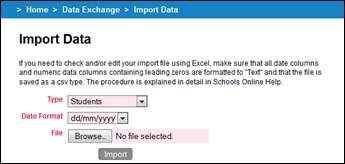
Data Exchange 1 Import Data (Student/Candidates)
To import student data:
1. From the Import Data screen, select ‘Students’ (SA), or ‘Candidate’ (NT), from the Type field.
2. Select a date format that matches the date format in the imported file. The accepted formats are:
· dd/mm/yyyy
· mm/dd/yyyy
· yyyy/mm/dd
· ddmmyyyy
· mmddyyyy
· yyyymmdd
3. Click on the Browse button and locate the students import file from your computer or the network.
4. Click on the Import button to import the file into the database. The Import Data Status screen may show progress as the students are imported.
5. If the data format or contents are not compatible with Schools Online an Import error report will be generated. Read the report and resolve the issues with the data before reimporting the file.
Any data not reported in the import error report will be imported (unless a record already exists)
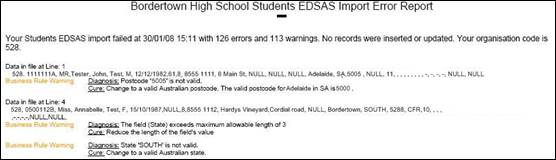
Data Exchange 2 Import error report (Student/Candidates)
Importing Teacher data
Map ID = 158
To import from another administrative system, you must create a teachers export file, and save it to a known location.
Menu: Home > Data Exchange > Import > Import Data
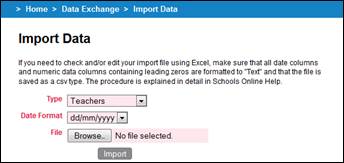
Data Exchange 3 Import Data (Teachers)
To import teacher data:
1. From the Import Data screen, select ‘Teachers’ from the Type field.
2. The date format choice is not applicable to the Teachers import so leave the default value as it is.
3. Click on the Browse button and locate the students import file from your computer or the network.
4. Click on the Import button to import the file into the database. The Import Data Status screen may show progress as the students are imported.
5. If the data format or contents are not compatible with Schools Online an Import error report will be generated. Read the report and resolve the issues with the data before reimporting the file.
Any data not reported in the import error report will be imported (unless a record already exists)
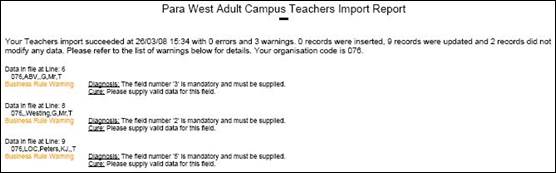
Data Exchange 4 Import error report (Teachers)
6. When the import is successful, an appropriate message will be displayed.
Importing Class data
Map ID = 173
To import from another administrative system, you must create a classes or class structure export file, and save it to a known location.
This is not the same as importing enrolments for your students. It is a separate process.
Menu: Home > Data Exchange > Import > Import Data
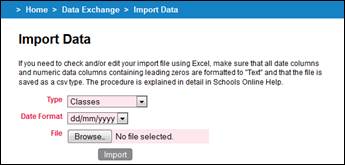
Data Exchange 5 Import Data (Classes/Class Structure)
To import class data:
1. From the Import Data screen, select Classes (SA), or Class Structure (NT), from the Type field.
2. The date format choice is not applicable to the classes or class structure import so leave the default value as it is.
3. Click on the Browse button and locate the students import file from your computer or the network.
4. Click on the Import button to import the file into the database. The Import Data Status screen may show progress as the students are imported.
5. If the data format or contents are not compatible with Schools Online an Import error report will be generated. Read the report and resolve the issues with the data before reimporting the file.
Any data not reported in the import error report will be imported (unless a record already exists)
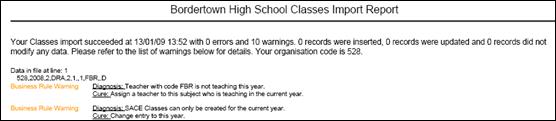
Data Exchange 6 Import error report (Classes/Class Structure)
6. When the import is successful, an appropriate message will be displayed.
Importing Enrolment data
Map ID = 180
To import from another administrative system, you must create a SACE Enrolments or Enrolments export file, and save it to a known location.
If no class structure exists for an enrolment, an import error will be displayed. It will be necessary to import or create the class structure and then attempt the SACE enrolments import again.
Menu: Home > Data Exchange > Import > Import Data
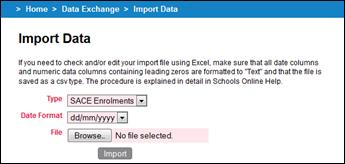
Data Exchange 7 Import Data (SACE Enrolments/Enrolments)
To import enrolment data:
1. From the Import Data screen, select SACE Enrolments (SA), or Enrolments (NT), from the Type field.
2. The date format choice is not applicable to the SACE Enrolments or Enrolments import so leave the default value as it is.
3. Click on the Browse button and locate the students import file from your computer or the network.
4. Click on the Import button to import the file into the database. The Import Data Status screen may show progress as the students are imported.
5. If the data format or contents are not compatible with Schools Online an Import error report will be generated. Read the report and resolve the issues with the data before reimporting the file.
Any data not reported in the import error report will be imported (unless a record already exists)
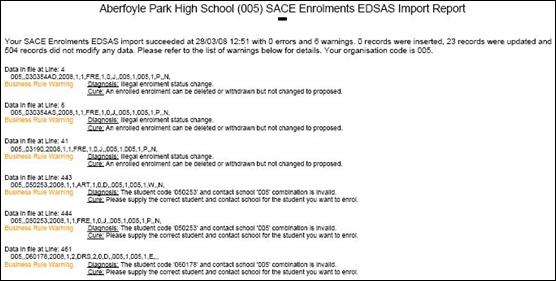
Data Exchange 8 Import error report (SACE Enrolments/Enrolments)
6. When the import is successful, an appropriate message will be displayed.
Importing VET Enrolment/VET Results data
Map ID = 192
To import from another administrative system, you must create a VET Enrolments or VET Results export file, and save it to a known location.
Menu: Home > Data Exchange > Import > Import Data
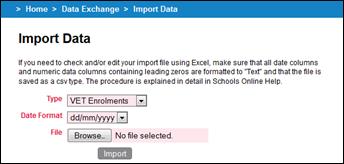
Data Exchange 9 Import Data (VET Enrolments/VET Results)
To import VET enrolment data:
1. From the Import Data screen, select ‘VET Enrolments’ (SA), or ‘VET Results’ (NT), from the Type field.
2. Select a date format that matches the date format in the imported file. The accepted formats are:
· dd/mm/yyyy
· mm/dd/yyyy
· yyyy/mm/dd
· ddmmyyyy
· mmddyyyy
· yyyymmdd
3. Click on the Browse button and locate the students import file from your computer or the network.
4. Click on the Import button to import the file into the database. The Import Data Status screen may show progress as the students are imported.
5. If the data format or contents are not compatible with Schools Online an Import error report will be generated. Read the report and resolve the issues with the data before reimporting the file.
Any data not reported in the import error report will be imported (unless a record already exists)
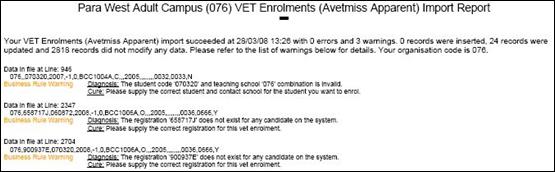
Data Exchange 10 Import error report (VET Enrolments/VET Results)
Importing CEA Data (SA Schools only)
Map ID = ???
To import from another administrative system, you must create a CEA Data export file and save it to a known location.
Menu: Home > Data Exchange > Import > Import Data
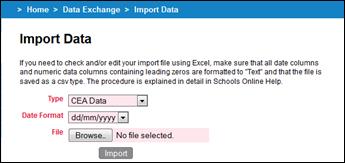
Data Exchange 11 Import Data (CEA Data)
To import CEA data:
1. From the Import Data screen, select ‘CEA Data’ from the Type field.
2. Select a date format that matches the date format in the imported file. The accepted formats are:
· dd/mm/yyyy
· mm/dd/yyyy
· yyyy/mm/dd
· ddmmyyyy
· mmddyyyy
· yyyymmdd
3. Click on the Browse button and locate the students import file from your computer or the network.
4. Click on the Import button to import the file into the database. The Import Data Status screen may show progress as the students are imported.
5. If the data format or contents are not compatible with Schools Online an Import error report will be generated. Read the report and resolve the issues with the data before reimporting the file.
Any data not reported in the import error report will be imported (unless a record already exists)
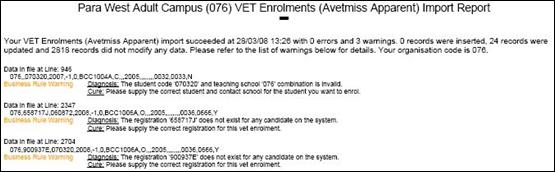
Data Exchange 12 Import error report (CEA Data)
6. When the import is successful, an appropriate message will be displayed.
Exporting data (SA)
Map ID = 203
Schools Online allows you to export your data and view each data file on screen or save the file to disk. You can then import the data into another administrative software system. The export files you can generate are:
· Classes (ClassExp.dat)
· SACE Enrolments (EnrlExp.dat)
· Subjects (SubjExp.dat)
· Students (StudExp.dat)
· Teachers (TchrExp.dat)
· VET Results (VETRExp.dat)
· CEA Data (CEAData.dat)
· CEA Reference Data (CEARExp.dat)
Selecting the export details (SA)
Menu: Home > Data Exchange > Export > Export Data
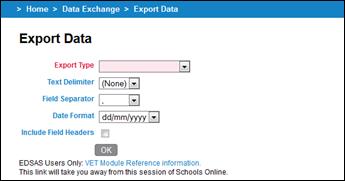
Data Exchange 13 Export Data
1. Click the Export Type down arrow to display the list of export types.
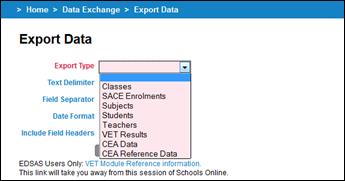
Data Exchange 14 Export Data - export type list
2. Select an Export Type from the list.
3. Select a Text Delimiter from the list. The accepted formats are:
· (None)
· " (Quotation mark)
4. Select a Field Separator from the list. The accepted formats are:
· (None)
· (Tab)
· , (Comma)
· | (Pipe)
· ~ (Tilde)
· _ (Underscore)
5. Select a Date Format for the export file. The accepted formats are:
· dd/mm/yyyy
· mm/dd/yyyy
· yyyy/mm/dd
· ddmmyyyy
· mmddyyyy
· yyyymmdd
If exporting Subjects to EDSAS you must choose “(None)” as the text delimiter and “(Tab)” as the field separator
6. If you want field headers in your export file, select Include Field Headers.
Running the export (SA)
To run the export from the Export Data screen:
1. Click on the OK button to begin the export. The Export Status screen will show that the data is being extracted from the database.
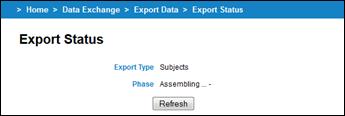
Data Exchange 15 Export Status – Retrieving Data
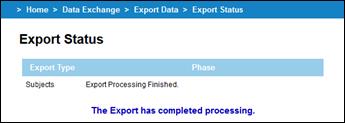
Data Exchange 16 Export Status – Export Completed
2. Choose either to Save the file or View the data when the data has been extracted.
Once the file has been prepared by Schools Online the browser should give you the options to save the file.
Exporting Class data (SA)
Menu: Home > Data Exchange > Export > Export Data
1. Select Classes from the list of export options on the Export Data screen.
2. Click on the OK button to begin the export.
Exporting SACE Enrolment data (SA)
Menu: Home > Data Exchange > Export > Export Data
1. Select SACE Enrolments from the list of export options on the Export Data screen.
2. Click on the OK button to begin the export.
Exporting Subject data (SA)
Menu: Home > Data Exchange > Export > Export Data
1. Select Subjects from the list of export options on the Export Data screen.
2. Click on the OK button to begin the export.
Exporting Student data (SA)
Menu: Home > Data Exchange > Export > Export Data
1. Select Students from the list of export options on the Export Data screen.
2. Click on the OK button to begin the export.
Exporting Teacher data (SA)
Menu: Home > Data Exchange > Export > Export Data
1. Select Teachers from the list of export options on the Export Data screen.
2. Click on the OK button to begin the export.
Exporting VET result data (SA)
Menu: Home > Data Exchange > Export > Export Data
1. Select VET Results from the list of export options on the Export Data screen.
2. Click on the OK button to begin the export.
Exporting CEA Reference data (SA)
Menu: Home > Data Exchange > Export > Export Data
1. Select CEA Reference Data from the list of export options on the Export Data screen.
2. Click on the OK button to begin the export.
Exporting CEA Data (SA)
Menu: Home > Data Exchange > Export > Export Data
1. Select CEA Data from the list of export options on the Export Data screen.
2. Click on the OK button to begin the export.
Exporting data (NT)
Map ID = 205
Schools Online allows you to export your data and view each data file on screen or save the file to disk. You can then import the data into another administrative software system. The export files you can generate are:
· Enrolments (Enrolments.csv)
· Subjects (Subjects.csv)
· Candidates (Candidates.csv)
· VET Results (VETResults.csv)
Selecting the export details (NT)
Menu: Home > Data Exchange > Export > Export Data
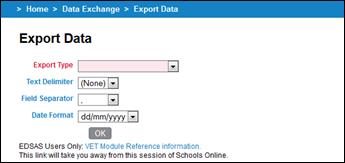
Data Exchange 17 Export Data
1. Click the Export Type down arrow to display the list of export types.
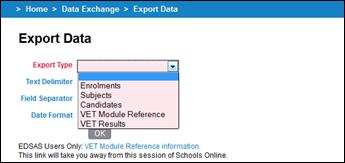
Data Exchange 18 Export Data - export type list
2. Select the file type you want from the list.
3. Select a Text Delimiter from the list. The accepted formats are:
· (None)
· " (Quotation mark)
4. Select a Field Separator from the list. The accepted formats are:
· (None)
· (Tab)
· , (Comma)
· | (Pipe)
· ~ (Tilde)
· _ (Underscore)
5. Select a Date Format for the export file. The accepted formats are:
· dd/mm/yyyy
· mm/dd/yyyy
· yyyy/mm/dd
· ddmmyyyy
· mmddyyyy
· yyyymmdd
Running the export (NT)
Menu: Home > Data Exchange > Export > Export Data
1. Click on the OK button to begin the export. The Export Status screen will show that the data is being extracted from the database.
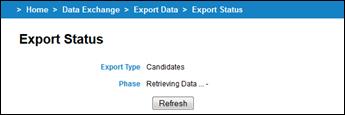
Data Exchange 19 Export Status – Retrieving Data
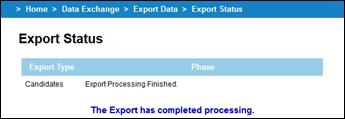
Data Exchange 20 Export Status – Export Completed
2. Choose either to Save the file or View the data when the data has been extracted.
Once the file has been prepared by Schools Online the browser should give you the options to save the file.
Exporting Enrolment data (NT)
Menu: Home > Data Exchange > Export > Export Data
1. Select Enrolments from the list of export options on the Export Data screen.
2. Click on the OK button.
Exporting Subject data (NT)
Menu: Home > Data Exchange > Export > Export Data
1. Select Subjects from the list of export options on the Export Data screen.
2. Click on the OK button.
Exporting Candidate data (NT)
Menu: Home > Data Exchange > Export > Export Data
1. Select Candidates from the list of export options on the Export Data screen.
2. Click on the OK button.
Exporting VET Result data (NT)
Menu: Home > Data Exchange > Export > Export Data
1. Select VET Results from the list of export options on the Export Data screen.
2. Click on the OK button.
Exporting Data – saving a file from an Internet Browser
Map ID = 110
Schools Online allows you to export your data and view each data file on screen or save the file. You can then import the data into another administrative software system.
This procedure may appear differently on your screen if you are using a browser (and version) other than Microsoft Internet Explorer 10, Google Chrome and Mozilla Firefox.
Microsoft Internet Explorer 10
Map ID = 111
1. When the data has been extracted, you will be prompted by Internet Explorer at the bottom of the screen.

Data Exchange 21 Internet Explorer File Download prompt
2. Click the down arrow next to Save button
3. From the menu that has now appeared, click on Save As.
4. As you chosen to save the file, you will be prompted to select a location for the file.
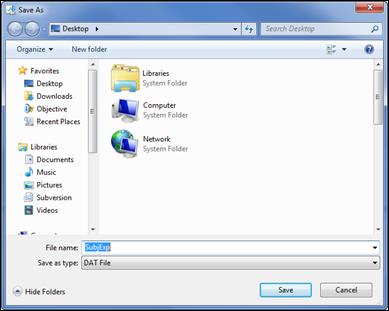
Data Exchange 22 Internet Explorer file download Save As prompt
5. Once you have selected by navigating to the most appropriate location to save the file click Save.
The file has now been saved in the location selected and ready to be imported into another administrative system.
Google Chrome
1. When the data has been extracted, you will be prompted by Google Chrome at the bottom of the screen.

Data Exchange 23 Google Chrome File Download prompt
2. Google Chrome has downloaded the file to the default location. You will need to access this location and move the file to another location as necessary.
The file is now ready to be imported into another administrative system.
Mozilla Firefox
Map ID = 112
1. When the data has been extracted, you will be prompted and should choose to Save File and then click on OK.
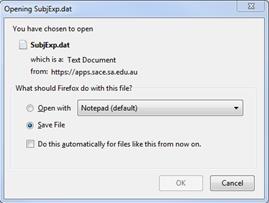
Data Exchange 24 Firefox file download prompt
2. As you chosen to save the file, you may be prompted to select a location for the file.
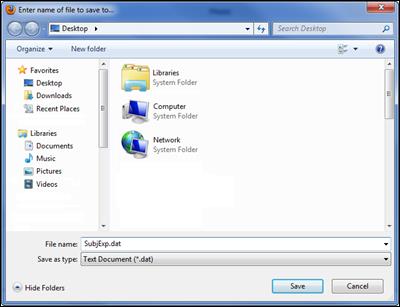
Data Exchange 25 Firefox file download Save to prompt
3. Once you have selected by navigating to the most appropriate location to save the file click Save.
The file has now been saved in the location selected and ready to be imported into another administrative system.
Opening a 'dat' file exported from Schools online
Map ID = 113
Most computers have file association so when you double click on a '.docx' file it will open Microsoft Word and that document will load. Files known as 'dat' file normally have no association and you will need to follow the instructions below to see the contents.
1. Double click on the 'dat' file and it will try to open the file with the associated program but by default ‘dat’ files have no associated program.
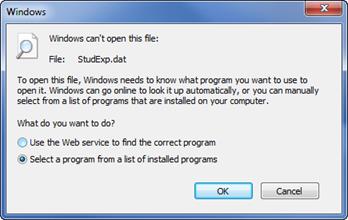
Data Exchange 26 Windows can’t open this file
2. Select the option to Select a program from a list of installed programs and then click on OK. A list of the programs installed on your computer will be displayed in the Open with window.
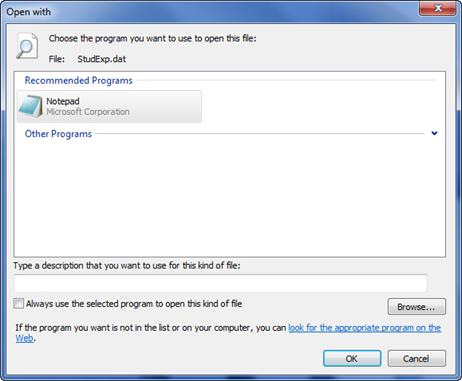
Data Exchange 27 Open With
3. Select a program from the list. It is suggested you use Notepad, WordPad or Microsoft Excel unless you have a reason for choosing another program.
Import and export file formats (SA)
SA Import file formats
Map ID = ???
The following tables list the fields and their characteristics in the import and export files for South Australian schools.
The Import files include:
· Students
· Teachers
· Classes
· SACE Enrolments
· VET Enrolments
· Compulsory Education Age (CEA) Data
SA Export file formats
Map ID = ???
The Export files include:
· Classes
· SACE Enrolments
· Subjects
· Students
· Teachers
· VET Results
· Compulsory Education Age (CEA) Data
· Compulsory Education Age (CEA) Reference Data
Import file formats (SA)
The following tables list the fields and their characteristics of the import files for South Australian schools.
The Import files include:
· Students
· Teachers
· Classes
· SACE Enrolments
· VET Enrolments
· Compulsory Education Age (CEA) Data
Students import file format (SA)
The following table lists fields, sizes and characteristics of students import file format for South Australia.
# |
Name |
Max Length |
Data Type |
Required or Mandatory Field |
Information |
1 |
Contact School Number |
3 |
Char |
True |
School Number issued by the SACE Board. |
2 |
Registration Number |
7 |
Char |
False |
Unique SACE Board Student Identifier. |
3 |
Student Code |
8 |
Char |
True |
Assigned by school, unique within school. |
4 |
Title |
4 |
Char |
False |
For example Mr, Miss, Ms. |
5 |
Given Names |
45 |
Char |
True |
Mixed case |
6 |
Family Name |
45 |
Char |
True |
Mixed case |
7 |
Gender |
1 |
Char |
True |
M or F |
8 |
Date of Birth |
10 |
Char |
True |
ddmmyyyy, dd/mm/yyyy, mmddyyyy, mm/dd/yyyy, yyyymmdd, yyyy/mm/dd (e.g. 28021985 or 02281985). HINT: Choose the correct format on the Import Data screen. |
9 |
Phone Country Code |
3 |
Char |
False |
If used, this must be a valid ABS country code (e.g. 061 = Australia). |
10 |
Phone Area Code |
4 |
Char |
False |
(e.g. 08 = South Australia) All three parts of the phone code must be used, or none. |
11 |
Local Phone Number |
10 |
Char |
False |
8-10 digits containing no spaces. |
12 |
Street Address Line 1 |
30 |
Char |
True |
Student address for documentation delivery |
13 |
Street Address Line 2 |
30 |
Char |
False |
Only to be used if required. |
14 |
Street Address Line 3 |
30 |
Char |
False |
Only to be used if required. |
15 |
Suburb |
45 |
Char |
True |
Will be converted to upper case. |
16 |
State |
3 |
Char |
True |
Use OS for overseas addresses. |
17 |
Post Code |
4 |
Char |
True |
Use OSOS for overseas addresses. |
18 |
Home Group |
8 |
Char |
False |
Assigned by student’s contact school. |
19 |
Year Level |
2 |
Char |
False |
8, 9, 10, 11, 12, 13, or valid EDSAS Census Year Level. |
20 |
Street Address Line 4 |
30 |
Char |
False |
Only to be used if required. |
21 |
TAFE ID |
10 |
Char |
False |
Unique TAFE Student Identifier |
22 |
ED ID |
13 |
Char |
False |
Applies to EDSAS and Dux. Null for other school admin systems. |
23 |
Ab/Tr Ind |
1 |
Char |
False |
‘Y’, ‘N’ or blank |
24 |
Email address |
100 |
Char |
False |
Student's email address (where available) |
Data Exchange 28 Students import file format (SA)
Teachers import file format (SA)
The following table lists the fields, sizes and characteristics of the teachers import file format for South Australia.
# |
Name |
Max Length |
Data Type |
Required or Mandatory Field |
Information |
1 |
Contact School Number |
3 |
Char |
True |
School Number issued by the SACE Board. |
2 |
Teacher Code |
8 |
Char |
True |
Assigned by school, unique within school. |
3 |
Family Name |
30 |
Char |
True |
The teacher's surname. |
4 |
Initials |
4 |
Char |
True |
First character of each of the teacher's given names. |
5 |
Title |
4 |
Char |
True |
The teacher's title. |
6 |
Type |
1 |
Char |
True |
Set to 'T' to indicate teacher |
7 |
Teacher Registration Number |
50 |
Char |
False |
The number allocated by the Teachers Registration Board. |
8 |
Email Address |
100 |
Char |
False |
The teacher's email address. |
9 |
Given Names |
50 |
Char |
False |
The teacher's first name(s). |
10 |
Date of Birth |
10 |
Char |
False |
The teacher's date of birth. Formats accepted are: ddmmyyyy, dd/mm/yyyy, mmddyyyy, mm/dd/yyyy, yyyymmdd or yyyy/mm/dd. |
11 |
Gender |
1 |
Char |
False |
The teacher's gender. One of 'M' (Male) or 'F' (Female). |
Data Exchange 29 Teachers import file format (SA)
Classes import file format (SA)
The following table lists the fields, sizes and characteristics of the classes import file format for South Australia.
# |
Name |
Max Length |
Data Type |
Required or Mandatory Field |
Information |
1 |
Contact School Number |
3 |
Char |
True |
School Number issued by the SACE Board |
2 |
Year |
4 |
Integer |
True |
ccyy (e.g. 2014) |
3 |
Stage |
1 |
Integer |
True |
1 or 2 |
4 |
SACE Code |
3 |
Char |
True |
SACE Subject Code (e.g. BIG) |
5 |
Credits |
2 |
Integer |
True |
Valid values: 10 or 20 |
6 |
Class Number |
2 |
Integer |
True |
01 to 98 |
7 |
Program Variant |
1 |
Char |
False |
A to Z |
8 |
Semester |
1 |
Integer |
True |
1 or 2 |
9 |
Teacher Code |
8 |
Char |
True |
Assigned by school, unique within school |
10 |
School Class Code |
10 |
Char |
False |
Assigned by school, unique within school |
11 |
Results Due |
1 |
Char |
True |
J (June) or D (December) |
Data Exchange 30 Classes import file format (SA)
SACE Enrolments import file format (SA)
The following table lists the fields, sizes and characteristics of the SACE enrolments import file format for South Australia.
# |
Name |
Max Length |
Data Type |
Required or Mandatory Field |
Information |
1 |
Contact School Number |
3 |
Integer |
True |
School Number issued by the SACE Board |
2 |
Registration Number |
7 |
Char |
False |
Unique SACE Board Student Identifier. |
3 |
Student Code |
8 |
Char |
True |
Assigned by school, unique within school |
4 |
Year |
4 |
Integer |
True |
ccyy (e.g. 2014) |
5 |
Semester |
1 |
Integer |
True |
1 or 2 |
6 |
Stage |
1 |
Integer |
True |
1 or 2 |
7 |
SACE Code |
3 |
Char |
True |
SACE Subject Code (e.g. BIG) |
8 |
Credits |
2 |
Integer |
True |
Valid values: 10 or 20 |
9 |
Enrolment Number |
2 |
Integer |
False |
If this is not set, a new enrolment is assumed. |
10 |
Results Due |
1 |
Char |
True |
J (June) or D (December) |
11 |
Program Variant |
1 |
Char |
False |
A to Z |
12 |
Teaching School Number |
3 |
Integer |
True |
The school at which the subject is taught. |
13 |
Assessment School Number |
3 |
Integer |
True |
The school at which the subject is assessed. |
14 |
Class Number |
2 |
Integer |
True |
Class number assigned by the teaching school. |
15 |
Enrolment Status |
1 |
Char |
True |
C (Completed), D or X (Deleted), P (Proposed), E or F (Enrolled), or W (Withdrawn). Must be in upper case. |
16 |
Repeat Indicator |
1 |
Char |
False |
Defaults to 'N' if not set. Set to Y if repeating the subject – only applies to Stage 1 enrolments. |
17 |
School Class Code |
10 |
Char |
False |
Class identifier, unique within the school. |
18 |
Stage 1 Grade |
1 |
Char |
False |
A, B, C, D, E, N or P |
19 |
Partial Credits |
2 |
Integer |
False |
Functionality not yet implemented. |
20 |
ED ID |
13 |
Integer |
False |
Applies to EDSAS and Dux. Null for other school administration systems. |
Data Exchange 31 SACE Enrolments import file format (SA)
VET Enrolments import file format (SA)
The following table lists the fields, sizes and characteristics of the VET enrolments import file format for South Australia.
# |
Name |
Max Length |
Data Type |
Required or Mandatory Field |
Information |
1 |
Contact School Number |
3 |
Integer |
True |
School Number issued by the SACE Board |
2 |
Registration Number |
7 |
Char |
False |
SACE Registration Number |
3 |
Student Code |
8 |
Char |
True |
Assigned by school, unique within school |
4 |
Commencement Date |
10 |
Date |
True |
dd/mm/ccyy (e.g. 16/02/2014) |
5 |
Enrolment Number |
3 |
Integer |
True |
Positive integer or 0 for embedded, -1 for standalone |
6 |
VET Module Number |
3 |
Integer |
False |
|
7 |
VET Module Id |
15 |
Char |
True |
National or State Competency Code (e.g. CPCCSH3005A) |
8 |
Result |
1 |
Char |
True |
Valid AVETMISS Result (e.g. P, O or F) |
9 |
When Changed |
10 |
Date |
False |
dd/mm/ccyy (e.g. 16/02/2014) |
10 |
Who Changed |
10 |
Char |
False |
|
11 |
Enrolment Year |
4 |
Integer |
False |
ccyy (e.g. 2014) |
12 |
Stage |
1 |
Integer |
False |
1 or 2 |
13 |
SACE Code |
3 |
Char |
False |
SACE Subject Code (e.g. BIG) |
14 |
Credits |
1 |
Integer |
False |
Valid values: 10 or 20 |
15 |
Semester |
1 |
Integer |
False |
1 or 2 |
16 |
Variant |
1 |
Char |
False |
A to Z |
17 |
Class Code |
10 |
Char |
False |
Assigned by school, unique within school |
18 |
Results Due |
1 |
Char |
False |
J (June) or D (December) |
19 |
Registered Training Organisation ID |
10 |
Char |
True |
RTO Code |
20 |
Certificate ID |
10 |
Char |
True |
Qualification Code |
21 |
School Apprenticeship Flag |
1 |
Char |
True |
Y or N |
22 |
Result Date |
10 |
Date |
False |
dd/mm/ccyy (e.g. 16/02/2014) |
Data Exchange 32 VET Enrolments import file format (SA)
CEA Data import file format (SA)
The following table lists the fields, sizes and characteristics of the CEA data import file format for South Australia.
# |
Name |
Max Length |
Data Type |
Required or Mandatory Field |
Information |
1 |
Contact School Number |
3 |
Integer |
True |
School Number issued by the SACE Board. |
2 |
Registration Number |
7 |
Char |
False |
SACE Registration Number. |
3 |
Student Code |
8 |
Char |
True |
Assigned by school, unique within school. |
4 |
ED ID |
13 |
Char |
False |
Applies to EDSAS and Dux only. Null/blank for data from other school administration systems. |
5 |
CEA Type e.g. |
4 |
Char |
True |
A code that identifies which of the ways a student can comply with the Act. |
6 |
CEA Category e.g. |
10 |
Char |
True |
A code that identifies which CEA category has been assigned to the young person. A complete listing of the categories that apply to each of the CEA types will need to be imported into the school administrative systems from Schools Online. To help with understanding, some examples (not yet finalised) of Categories for each type are shown at left. |
7 |
Deleted Indicator |
1 |
Char |
False |
'Y' or Null. |
8 |
Start Date |
10 |
Char |
True |
The commencement data of the CEA type
(compliance with the act). |
9 |
End Date |
10 |
Char |
False |
The end date of the CEA type (compliance
with the act). |
Data Exchange 33 CEA Data import file format (SA)
Export file formats (SA)
Map ID = 136
The Export files include:
· Classes
· SACE Enrolments
· Subjects
· Students
· Teachers
· VET Results
· Compulsory Education Age (CEA) Data
· Compulsory Education Age (CEA) Reference Data
Classes export file format (SA)
The following table lists the fields, sizes and characteristics of the Classes export file format for South Australia.
# |
Name |
Max Length |
Data Type |
Information |
1 |
Contact School Number |
3 |
Char |
School Number issued by the SACE Board |
2 |
Year |
4 |
Integer |
ccyy (e.g. 2014) |
3 |
Stage |
1 |
Integer |
Valid values: 1 or 2 |
4 |
SACE Code |
3 |
Char |
Valid SACE Subject Code (e.g. BIG - Alpha-Numeric) |
5 |
Credits |
2 |
Integer |
Valid values: 10 and 20 |
6 |
Class Number |
2 |
Integer |
Class number assigned by the teaching school. |
7 |
Program Variant |
1 |
Char |
Is characters A to Z only or is otherwise blank. |
8 |
Semester |
1 |
Integer |
Valid values: 1 or 2 |
9 |
Teacher Code |
8 |
Char |
Teacher identifier |
10 |
School Class Code |
10 |
Char |
Assigned by school, unique within school |
11 |
Results Due |
1 |
Char |
J (June) or D (December) |
12 |
Accession Number |
8 |
Char |
Unique Assessment Plan Approval Number |
Data Exchange 34 Classes export file format (SA)
SACE Enrolments export file format (SA)
The following table lists the fields, sizes and characteristics of the SACE Enrolments export file format for South Australia.
# |
Name |
Max Length |
Data Type |
Information |
1 |
Registration Number |
7 |
Char |
SACE Student Number composed of 6 digits and one check character. (e.g. 123456H) |
2 |
Enrolment Number |
2 |
Integer |
The number assigned to the student's enrolment by the SACE Board. |
3 |
Stage |
1 |
Integer |
Valid values: 1 or 2 |
4 |
SACE Code |
3 |
Char |
Valid SACE Subject Code (e.g. BIO - Alpha-Numeric) |
5 |
Credits |
2 |
Integer |
Valid values: 10 or 20 |
6 |
Year |
4 |
Integer |
ccyy (eg. 2014) |
7 |
Semester |
1 |
Integer |
Valid values: 1 or 2 |
8 |
Results Due |
1 |
Char |
J (June) or D (December) |
9 |
Teaching School Number |
3 |
Char |
School Number issued by the SACE Board |
10 |
Class Number |
2 |
Integer |
Class number assigned by the teaching school. |
11 |
Program Variant |
1 |
Char |
Valid values: A to Z |
12 |
Assessment School Number |
3 |
Char |
School Number issued by the SACE Board |
13 |
Repeat Indicator |
1 |
Char |
Valid values: Y or N |
14 |
Enrol Date |
10 |
Date |
Date format: dd/mm/yyyy |
15 |
Enrolment Status |
1 |
Char |
E (Enrolled), W (Withdrawn), D (Deleted), G (Granted), C (Completed) |
16 |
When Created |
10 |
Date |
Date format: dd/mm/yyyy |
17 |
Who Created |
10 |
Char |
Identifies the user responsible for creating the enrolment. |
18 |
When Changed |
10 |
Date |
Date format: dd/mm/yyyy |
19 |
Who Changed |
10 |
Char |
Identifies the user responsible for the last modification to the enrolment record. |
20 |
Levelled Result |
1 |
Char |
V (OA), S (SA), R (RA), N (RNM) |
21 |
When Completed |
5 |
Integer |
The year that the enrolment was completed + start semester. eg. 20141 |
22 |
Eligibility Indicator |
1 |
Char |
Valid values: Y or N or blank. Only applies to language subjects. |
23 |
Student Code |
8 |
Char |
Student identifier, unique within the school. |
24 |
Contact School Number |
3 |
Char |
School Number issued by the SACE Board |
25 |
Exam Centre |
3 |
Char |
School Number issued by the SACE Board |
26 |
Pairing Indicator |
2 |
Integer |
Historic field - used for pairing single unit Stage 2 enrolments. |
27 |
Achievement Score |
2 |
Integer |
Integer, between 0 and 20 |
28 |
School Score |
2 |
Integer |
Integer, between 0 and 20 |
29 |
Speed |
5 |
Float |
A numeric with floating precision where -1 equates to NULL |
30 |
HEES |
4 |
Float |
Scaled achievement score. Valid values between 0.0 and 20.0. |
31 |
School Level |
1 |
Char |
Historic field - result supplied by the school. Only applies to Stage 2 levelled result type subjects. |
32 |
School Grade |
1 |
Char |
Grade supplied by the school - only applies to Stage 2 enrolments. |
33 |
School Class Code |
10 |
Char |
Assigned by school, unique within school |
34 |
ED ID |
13 |
Char |
Applies to EDSAS and Dux. Blank for other school admin systems. |
35 |
Stage 1 Grade |
1 |
Char |
A, B, C, D, E, N or P |
36 |
Partial Credits |
2 |
Integer |
Functionality not yet implemented. |
37 |
Results Type |
1 |
Char |
L = Levelled Result, S = Scored, G =
Graded, |
Data Exchange 35 SACE Enrolments export file format (SA)
Subjects export file format (SA)
The following table lists the fields, sizes and characteristics of the Subjects export file format for South Australia.
# |
Name |
Max Length |
Data Type |
Information |
1 |
Stage |
1 |
Integer |
Valid values: 1 or 2 |
2 |
SACE Code |
3 |
Char |
Valid SACE Subject Code (e.g. BIG - Alpha-Numeric) |
3 |
Credits |
2 |
Integer |
Valid values: 10 or 20 |
4 |
Expiry Date |
10 |
Date |
Date format: dd/mm/yyyy |
5 |
Subject Name |
128 |
Char |
Name of the SACE subject |
6 |
Descriptor |
- |
Text |
Detailed subject information |
7 |
Subject Type |
1 |
Char |
‘P’ = PES, ‘S’ – SAS, ‘A’ = PAS |
8 |
New SACE subject flag |
1 |
Char |
‘Y’ or “N’. Used to identify whether a subject is a current SACE or new SACE subject (for 2010 onwards). |
9 |
Result Type |
1 |
Char |
L = Levelled Result, S = Scored, G =
Graded, |
Data Exchange 36 Subjects export file format (SA)
Students export file format (SA)
The following table lists the fields, sizes and characteristics of the Students export file format for South Australia.
# |
Name |
Max Length |
Data Type |
Information |
1 |
Registration |
7 |
Char |
SACE Registration Number composed of 6 digits and one check character. (e.g. 123456H) |
2 |
Surname |
45 |
Char |
Student's surname |
3 |
Given Names |
45 |
Char |
Student's first name(s) |
4 |
Title |
4 |
Char |
For example Mr, Miss, Ms |
5 |
Address Line 1 |
30 |
Char |
Student's address for documentation delivery. |
6 |
Address Line 2 |
30 |
Char |
Field will be empty unless data provided. |
7 |
Address Line 3 |
30 |
Char |
Field will be empty unless data provided. |
8 |
Address Line 4 |
30 |
Char |
Field will be empty unless data provided. |
9 |
Suburb |
45 |
Char |
Student's suburb unless an overseas student. |
10 |
Post Code |
4 |
Char |
Student's postcode unless an overseas student. |
11 |
State |
3 |
Char |
Student's state unless an overseas student. |
12 |
Date of Birth |
10 |
Date |
Possible format options: ddmmyyyy, dd/mm/yyyy, mmddyyyy, mm/dd/yyyy, yyyymmdd or yyyy/mm/dd |
13 |
Gender |
1 |
Char |
M or F |
14 |
Contact School |
3 |
Char |
School Number issued by the SACE Board |
15 |
Status |
1 |
Char |
E (Enrolled), C (Completed), D (Deleted) |
16 |
Date Completed |
10 |
Date |
Blank until the candidate has completed. |
17 |
Date Registered |
10 |
Date |
Date the student registered with the SACE. |
18 |
When Created |
10 |
Date |
Date the student record was created. |
19 |
Who Created |
10 |
Char |
Identifies the user responsible for registering the student. |
20 |
When Changed |
10 |
Date |
Date of last modification to the student record. |
21 |
Who Changed |
10 |
Char |
Identifies the user responsible for the last modification to the student record. |
22 |
Visa |
1 |
Char |
Valid values: Y or N |
23 |
HEES Declaration |
1 |
Char |
Valid values: Y or N |
24 |
Institutions Declaration |
1 |
Char |
Valid values: Y or N |
25 |
Media Declaration |
1 |
Char |
Valid values: Y or N |
26 |
Student Code |
8 |
Char |
Assigned by school, unique within school |
27 |
Certificate Printed |
1 |
Char |
Valid values: Y or N |
28 |
Comp Comp Subject |
1 |
Char |
Stage 1 compulsory subjects completed. Valid values ‘Y’ or ‘N’. |
29 |
Comp Num Units |
1 |
Char |
22 SACE units have been completed. Valid values ‘Y’ or ‘N’. |
30 |
Comp Pattern |
1 |
Char |
All Stage 1 requirements have been met. Valid values ‘Y’ or ‘N’. |
31 |
Active Ind |
1 |
Char |
Valid values 'Y', 'N' or blank |
32 |
Adult Ind |
1 |
Char |
Valid values: Y, N, or Blank |
33 |
EDHO Number |
13 |
Char |
EDSAS student identifier. Blank for other school admin systems. |
34 |
Phone Country Code |
3 |
Integer |
e.g. 061 |
35 |
Phone Area Code |
4 |
Integer |
e.g. 08 |
36 |
Phone Number |
10 |
Integer |
8-10 digits containing no spaces. |
37 |
Reg Slip Printed |
1 |
Char |
Valid values ‘P’, ‘N’, ‘U’ and blank. |
38 |
Home Group |
8 |
Char |
Assigned by student’s contact school. |
39 |
Year Level |
2 |
Char |
10, 11, 12, 13, SL, etc |
40 |
Ab/Tr Descent |
1 |
Char |
Valid values ‘A’, ‘T’, ‘N’, ‘B’, blank. Collected from the student registration slip. |
41 |
Country Born |
2 |
Char |
Code that identifies the country in which the student was born. Collected from the student registration slip. |
42 |
Language at Home |
2 |
Char |
Code that identifies the language spoken at home by the student. Collected from the student registration slip. |
43 |
Other Lang Occ |
2 |
Char |
Code that identifies any other language spoken occasionally by the student. Collected from the student registration slip. |
44 |
Other Lang Often |
2 |
Char |
Code that identifies any other language often spoken by the student. Collected from the student registration slip. |
45 |
Years in Australia |
2 |
Integer |
Number of years student has been living in Australia. |
46 |
ESB |
2 |
Char |
Valid values ‘EG’, ‘NE’ and ‘NA’. |
47 |
TAFE ID |
10 |
Char |
TAFE identifier. Blank if not supplied by the contact school. |
48 |
ED ID |
13 |
Char |
Applies to EDSAS and Dux. Blank for other school admin systems. |
49 |
Email address |
100 |
Char |
Optional. Student's email address. |
50 |
Eligible for Modified Subjects |
1 |
Char |
Identified whether the student is eligible for modified subjects. |
Data Exchange 37 Students export file format (SA)
Teachers export file format (SA)
The following table lists the fields, sizes and characteristics of the Teachers export file format for South Australia.
# |
Name |
Max Length |
Data Type |
Information |
1 |
Contact School Number |
3 |
Char |
School Number issued by the SACE Board |
2 |
Teacher Code |
8 |
Char |
Assigned by school, unique within school |
3 |
Family Name |
30 |
Char |
The teacher's surname. |
4 |
Initials |
4 |
Char |
First character of each of the teacher's given names. |
5 |
Title |
4 |
Char |
The teacher's title. |
6 |
Type |
1 |
Char |
'T' to indicate teacher |
Data Exchange 38 Teachers export file format (SA)
VET Results export file format (SA)
The following table lists the fields, sizes and characteristics of the VET Results export file format for South Australia.
# |
Name |
Max Length |
Data Type |
Information |
1 |
Contact School Number |
3 |
Integer |
School Number issued by the SACE Board |
2 |
Student Code |
8 |
Char |
Assigned by school, unique within school |
3 |
VET Year |
4 |
Integer |
ccyy (e.g. 2014) |
4 |
Enrolment Number |
3 |
Integer |
Positive Integer |
5 |
VET Module Number |
3 |
Integer |
|
6 |
VET Module ID |
12 |
Char |
National or State Competency Code (e.g. CPCCSH3005A) |
7 |
Result |
1 |
Char |
Valid AVETMISS Result (e.g. P, O or F) |
8 |
When Changed |
10 |
Date |
Date format: dd/mm/yyyy |
9 |
Who Changed |
25 |
Char |
|
10 |
Registration Number |
7 |
Char |
SACE Board student Number composed of 6 digits and one check character. (e.g. 123456H) |
11 |
Enrolment Year |
4 |
Integer |
ccyy (e.g. 2014) |
12 |
Stage |
1 |
Char |
Valid values: 1 or 2 |
13 |
SACE Code |
3 |
Char |
Valid SACE Subject Code (e.g. BIG - Alpha-Numeric) |
14 |
Credits |
2 |
Integer |
|
15 |
Semester |
1 |
Integer |
Valid values: 1 or 2 |
16 |
Variant |
1 |
Char |
Valid values: A to Z |
17 |
Class Code |
8 |
Char |
Assigned by school, unique within school |
18 |
Results Due |
1 |
Char |
J (June) or D (December) |
Data Exchange 39 VET Results export file format (SA)
CEA Data export file format (SA)
The following table lists the fields, sizes and characteristics of the CEA Data export file format for South Australia.
# |
Name |
Max Length |
Data Type |
Information |
1 |
Contact School Code |
3 |
Char |
School Code issued by the SACE Board. |
2 |
Registration Number |
7 |
Char |
Unique SACE Board Student Identifier (Note: Provisional). |
3 |
Student Code |
8 |
Char |
Student identifier, assigned by the school, unique within the school. |
4 |
ED ID |
13 |
Char |
Applies to EDSAS and Dux. Blank for other school administrative systems. |
5 |
CEA Type |
4 |
Char |
Identifies which of the 2 ways a student can comply with the Act. (e.g. ALP, Exemption, Non-participation) |
6 |
CEA Category |
10 |
Char |
A complete listing of the categories that apply to each of the 3 CEA types will need to be imported into other school administrative systems from Schools Online. |
7 |
Deleted Indicator |
1 |
Char |
'Y' or Null, |
8 |
Start Date |
10 |
Char |
The commencement date of the CEA type (compliance with the act). Selectable output formats are: ddmmyyyy, dd/mm/yyyy, mmddyyyy, mm/dd/yyyy, yyyymmdd or yyyy/mm/dd. |
9 |
End Date |
10 |
Char |
The end date of the CEA type (compliance with the act). Selectable output formats are: ddmmyyyy, dd/mm/yyyy, mmddyyyy, mm/dd/yyyy, yyyymmdd or yyyy/mm/dd. |
Data Exchange 40 CEA Data export file format (SA)
CEA Reference Data export file format (SA)
The following table lists the fields, sizes and characteristics of the CEA Reference Data export file format for South Australia.
# |
Name |
Max Length |
Data Type |
Information |
1 |
Code Type |
4 |
Char |
The code will identify a CEA type. (Values to be confirmed). |
2 |
Code |
10 |
Char |
Code used to identify a CEA Category available under the CEA Type identified in field 1. (Values to be confirmed). |
3 |
Description |
50 |
Char |
A description of the CEA Type/CEA Category. |
Data Exchange 41 CEA Reference Data export file format (SA)
Import and export file formats (SACE International)
SACE International Import file formats
Map ID = ???
The following tables list the fields and their characteristics in the import and export files for SACE International schools.
The Import files include:
· Students
· Teachers
· Classes
· SACE Enrolments
· VET Enrolments
· Compulsory Education Age (CEA) Data
SACE International Export file formats
Map ID = ???
The Export files include:
· Classes
· SACE Enrolments
· Subjects
· Students
· Teachers
· VET Results
· Compulsory Education Age (CEA) Data
· Compulsory Education Age (CEA) Reference Data
Import file formats (SACE International)
The following tables list the fields and their characteristics of the import files for SACE International schools.
The Import files include:
· Students
· Teachers
· Classes
· SACE Enrolments
· VET Enrolments
· Compulsory Education Age (CEA) Data
Students import file format (SACE International)
The following table lists fields, sizes and characteristics of students import file format for SACE International.
# |
Name |
Max Length |
Data Type |
Required or Mandatory Field |
Information |
1 |
Contact School Number |
3 |
Char |
True |
School Number issued by the SACE Board. |
2 |
Registration Number |
7 |
Char |
False |
Unique SACE Board Student Identifier. |
3 |
Student Code |
8 |
Char |
True |
Assigned by school, unique within school. |
4 |
Title |
4 |
Char |
False |
For example Mr, Miss, Ms. |
5 |
Given Names |
45 |
Char |
True |
Mixed case |
6 |
Family Name |
45 |
Char |
True |
Mixed case |
7 |
Gender |
1 |
Char |
True |
M or F |
8 |
Date of Birth |
10 |
Char |
True |
ddmmyyyy, dd/mm/yyyy, mmddyyyy, mm/dd/yyyy, yyyymmdd, yyyy/mm/dd (e.g. 28021985 or 02281985). HINT: Choose the correct format on the Import Data screen. |
9 |
Phone Country Code |
3 |
Char |
False |
If used, this must be a valid ABS country code (e.g. 061 = Australia). |
10 |
Phone Area Code |
4 |
Char |
False |
(e.g. 08 = South Australia) All three parts of the phone code must be used, or none. |
11 |
Local Phone Number |
10 |
Char |
False |
8-10 digits containing no spaces. |
12 |
Street Address Line 1 |
30 |
Char |
True |
Student address for documentation delivery |
13 |
Street Address Line 2 |
30 |
Char |
False |
Only to be used if required. |
14 |
Street Address Line 3 |
30 |
Char |
False |
Only to be used if required. |
15 |
Suburb |
45 |
Char |
True |
Will be converted to upper case. |
16 |
State |
3 |
Char |
True |
Use OS for overseas addresses. |
17 |
Post Code |
4 |
Char |
True |
Use OSOS for overseas addresses. |
18 |
Home Group |
8 |
Char |
False |
Assigned by student’s contact school. |
19 |
Year Level |
2 |
Char |
False |
8, 9, 10, 11, 12, 13, or valid EDSAS Census Year Level. |
20 |
Street Address Line 4 |
30 |
Char |
False |
Only to be used if required. |
21 |
TAFE ID |
10 |
Char |
False |
Unique TAFE Student Identifier |
22 |
ED ID |
13 |
Char |
False |
Applies to EDSAS and Dux. Null for other school admin systems. |
23 |
Ab/Tr Ind |
1 |
Char |
False |
‘Y’, ‘N’ or blank |
24 |
Email address |
100 |
Char |
False |
Student's email address (where available) |
25 |
Stream ID |
2 |
Char |
False |
Assessment Cycle ID |
Data Exchange 28 Students import file format (SACE International)
Teachers import file format (SACE International)
The following table lists the fields, sizes and characteristics of the teachers import file format for SACE International.
# |
Name |
Max Length |
Data Type |
Required or Mandatory Field |
Information |
1 |
Contact School Number |
3 |
Char |
True |
School Number issued by the SACE Board. |
2 |
Teacher Code |
8 |
Char |
True |
Assigned by school, unique within school. |
3 |
Family Name |
30 |
Char |
True |
The teacher's surname. |
4 |
Initials |
4 |
Char |
True |
First character of each of the teacher's given names. |
5 |
Title |
4 |
Char |
True |
The teacher's title. |
6 |
Type |
1 |
Char |
True |
Set to 'T' to indicate teacher |
7 |
Teacher Registration Number |
50 |
Char |
False |
The number allocated by the Teachers Registration Board. |
8 |
Email Address |
100 |
Char |
False |
The teacher's email address. |
9 |
Given Names |
50 |
Char |
False |
The teacher's first name(s). |
10 |
Date of Birth |
10 |
Char |
False |
The teacher's date of birth. Formats accepted are: ddmmyyyy, dd/mm/yyyy, mmddyyyy, mm/dd/yyyy, yyyymmdd or yyyy/mm/dd. |
11 |
Gender |
1 |
Char |
False |
The teacher's gender. One of 'M' (Male) or 'F' (Female). |
Data Exchange 29 Teachers import file format (SACE International)
Classes import file format (SACE International)
The following table lists the fields, sizes and characteristics of the classes import file format for SACE International.
# |
Name |
Max Length |
Data Type |
Required or Mandatory Field |
Information |
1 |
Contact School Number |
3 |
Char |
True |
School Number issued by the SACE Board |
2 |
Year |
4 |
Integer |
True |
ccyy (e.g. 2014) |
3 |
Stage |
1 |
Integer |
True |
1 or 2 |
4 |
SACE Code |
3 |
Char |
True |
SACE Subject Code (e.g. BIG) |
5 |
Credits |
2 |
Integer |
True |
Valid values: 10 or 20 |
6 |
Class Number |
2 |
Integer |
True |
01 to 98 |
7 |
Program Variant |
1 |
Char |
False |
A to Z |
8 |
Semester |
1 |
Integer |
True |
1 or 2 |
9 |
Teacher Code |
8 |
Char |
True |
Assigned by school, unique within school |
10 |
School Class Code |
10 |
Char |
False |
Assigned by school, unique within school |
11 |
Results Due |
1 |
Char |
True |
J (June) or D (December) |
12 |
Stream ID |
2 |
Char |
False |
Assessment Cycle ID |
Data Exchange 30 Classes import file format (SACE International)
SACE Enrolments import file format (SACE International)
The following table lists the fields, sizes and characteristics of the SACE enrolments import file format for SACE International.
# |
Name |
Max Length |
Data Type |
Required or Mandatory Field |
Information |
1 |
Contact School Number |
3 |
Integer |
True |
School Number issued by the SACE Board |
2 |
Registration Number |
7 |
Char |
False |
Unique SACE Board Student Identifier. |
3 |
Student Code |
8 |
Char |
True |
Assigned by school, unique within school |
4 |
Year |
4 |
Integer |
True |
ccyy (e.g. 2014) |
5 |
Semester |
1 |
Integer |
True |
1 or 2 |
6 |
Stage |
1 |
Integer |
True |
1 or 2 |
7 |
SACE Code |
3 |
Char |
True |
SACE Subject Code (e.g. BIG) |
8 |
Credits |
2 |
Integer |
True |
Valid values: 10 or 20 |
9 |
Enrolment Number |
2 |
Integer |
False |
If this is not set, a new enrolment is assumed. |
10 |
Results Due |
1 |
Char |
True |
J (June) or D (December) |
11 |
Program Variant |
1 |
Char |
False |
A to Z |
12 |
Teaching School Number |
3 |
Integer |
True |
The school at which the subject is taught. |
13 |
Assessment School Number |
3 |
Integer |
True |
The school at which the subject is assessed. |
14 |
Class Number |
2 |
Integer |
True |
Class number assigned by the teaching school. |
15 |
Enrolment Status |
1 |
Char |
True |
C (Completed), D or X (Deleted), P (Proposed), E or F (Enrolled), or W (Withdrawn). Must be in upper case. |
16 |
Repeat Indicator |
1 |
Char |
False |
Defaults to 'N' if not set. Set to Y if repeating the subject – only applies to Stage 1 enrolments. |
17 |
School Class Code |
10 |
Char |
False |
Class identifier, unique within the school. |
18 |
Stage 1 Grade |
1 |
Char |
False |
A, B, C, D, E, N or P |
19 |
Partial Credits |
2 |
Integer |
False |
Functionality not yet implemented. |
20 |
ED ID |
13 |
Integer |
False |
Applies to EDSAS and Dux. Null for other school administration systems. |
21 |
Stream ID |
2 |
Char |
False |
Assessment Cycle ID |
Data Exchange 31 SACE Enrolments import file format (SACE International)
VET Enrolments import file format (SACE International)
The following table lists the fields, sizes and characteristics of the VET enrolments import file format for SACE International.
# |
Name |
Max Length |
Data Type |
Required or Mandatory Field |
Information |
1 |
Contact School Number |
3 |
Integer |
True |
School Number issued by the SACE Board |
2 |
Registration Number |
7 |
Char |
False |
SACE Registration Number |
3 |
Student Code |
8 |
Char |
True |
Assigned by school, unique within school |
4 |
Commencement Date |
10 |
Date |
True |
dd/mm/ccyy (e.g. 16/02/2014) |
5 |
Enrolment Number |
3 |
Integer |
True |
Positive integer or 0 for embedded, -1 for standalone |
6 |
VET Module Number |
3 |
Integer |
False |
|
7 |
VET Module Id |
15 |
Char |
True |
National or State Competency Code (e.g. CPCCSH3005A) |
8 |
Result |
1 |
Char |
True |
Valid AVETMISS Result (e.g. P, O or F) |
9 |
When Changed |
10 |
Date |
False |
dd/mm/ccyy (e.g. 16/02/2014) |
10 |
Who Changed |
10 |
Char |
False |
|
11 |
Enrolment Year |
4 |
Integer |
False |
ccyy (e.g. 2014) |
12 |
Stage |
1 |
Integer |
False |
1 or 2 |
13 |
SACE Code |
3 |
Char |
False |
SACE Subject Code (e.g. BIG) |
14 |
Credits |
1 |
Integer |
False |
Valid values: 10 or 20 |
15 |
Semester |
1 |
Integer |
False |
1 or 2 |
16 |
Variant |
1 |
Char |
False |
A to Z |
17 |
Class Code |
10 |
Char |
False |
Assigned by school, unique within school |
18 |
Results Due |
1 |
Char |
False |
J (June) or D (December) |
19 |
Registered Training Organisation ID |
10 |
Char |
True |
RTO Code |
20 |
Certificate ID |
10 |
Char |
True |
Qualification Code |
21 |
School Apprenticeship Flag |
1 |
Char |
True |
Y or N |
22 |
Result Date |
10 |
Date |
False |
dd/mm/ccyy (e.g. 16/02/2014) |
Data Exchange 32 VET Enrolments import file format (SACE International)
CEA Data import file format (SACE International)
The following table lists the fields, sizes and characteristics of the CEA data import file format for SACE International.
# |
Name |
Max Length |
Data Type |
Required or Mandatory Field |
Information |
1 |
Contact School Number |
3 |
Integer |
True |
School Number issued by the SACE Board. |
2 |
Registration Number |
7 |
Char |
False |
SACE Registration Number. |
3 |
Student Code |
8 |
Char |
True |
Assigned by school, unique within school. |
4 |
ED ID |
13 |
Char |
False |
Applies to EDSAS and Dux only. Null/blank for data from other school administration systems. |
5 |
CEA Type e.g. |
4 |
Char |
True |
A code that identifies which of the ways a student can comply with the Act. |
6 |
CEA Category e.g. |
10 |
Char |
True |
A code that identifies which CEA category has been assigned to the young person. A complete listing of the categories that apply to each of the CEA types will need to be imported into the school administrative systems from Schools Online. To help with understanding, some examples (not yet finalised) of Categories for each type are shown at left. |
7 |
Deleted Indicator |
1 |
Char |
False |
'Y' or Null. |
8 |
Start Date |
10 |
Char |
True |
The commencement data of the CEA type
(compliance with the act). |
9 |
End Date |
10 |
Char |
False |
The end date of the CEA type (compliance
with the act). |
Data Exchange 33 CEA Data import file format (SACE International)
Export file formats (SACE International)
Map ID = 136
The Export files include:
· Classes
· SACE Enrolments
· Subjects
· Students
· Teachers
· VET Results
· Compulsory Education Age (CEA) Data
· Compulsory Education Age (CEA) Reference Data
Classes export file format (SACE International)
The following table lists the fields, sizes and characteristics of the Classes export file format for SACE International.
# |
Name |
Max Length |
Data Type |
Information |
1 |
Contact School Number |
3 |
Char |
School Number issued by the SACE Board |
2 |
Year |
4 |
Integer |
ccyy (e.g. 2014) |
3 |
Stage |
1 |
Integer |
Valid values: 1 or 2 |
4 |
SACE Code |
3 |
Char |
Valid SACE Subject Code (e.g. BIG - Alpha-Numeric) |
5 |
Credits |
2 |
Integer |
Valid values: 10 and 20 |
6 |
Class Number |
2 |
Integer |
Class number assigned by the teaching school. |
7 |
Program Variant |
1 |
Char |
Is characters A to Z only or is otherwise blank. |
8 |
Semester |
1 |
Integer |
Valid values: 1 or 2 |
9 |
Teacher Code |
8 |
Char |
Teacher identifier |
10 |
School Class Code |
10 |
Char |
Assigned by school, unique within school |
11 |
Results Due |
1 |
Char |
J (June) or D (December) |
12 |
Accession Number |
8 |
Char |
Unique Assessment Plan Approval Number |
Data Exchange 34 Classes export file format (SACE International)
SACE Enrolments export file format (SACE International)
The following table lists the fields, sizes and characteristics of the SACE Enrolments export file format for SACE International.
# |
Name |
Max Length |
Data Type |
Information |
1 |
Registration Number |
7 |
Char |
SACE Student Number composed of 6 digits and one check character. (e.g. 123456H) |
2 |
Enrolment Number |
2 |
Integer |
The number assigned to the student's enrolment by the SACE Board. |
3 |
Stage |
1 |
Integer |
Valid values: 1 or 2 |
4 |
SACE Code |
3 |
Char |
Valid SACE Subject Code (e.g. BIO - Alpha-Numeric) |
5 |
Credits |
2 |
Integer |
Valid values: 10 or 20 |
6 |
Year |
4 |
Integer |
ccyy (eg. 2014) |
7 |
Semester |
1 |
Integer |
Valid values: 1 or 2 |
8 |
Results Due |
1 |
Char |
J (June) or D (December) |
9 |
Teaching School Number |
3 |
Char |
School Number issued by the SACE Board |
10 |
Class Number |
2 |
Integer |
Class number assigned by the teaching school. |
11 |
Program Variant |
1 |
Char |
Valid values: A to Z |
12 |
Assessment School Number |
3 |
Char |
School Number issued by the SACE Board |
13 |
Repeat Indicator |
1 |
Char |
Valid values: Y or N |
14 |
Enrol Date |
10 |
Date |
Date format: dd/mm/yyyy |
15 |
Enrolment Status |
1 |
Char |
E (Enrolled), W (Withdrawn), D (Deleted), G (Granted), C (Completed) |
16 |
When Created |
10 |
Date |
Date format: dd/mm/yyyy |
17 |
Who Created |
10 |
Char |
Identifies the user responsible for creating the enrolment. |
18 |
When Changed |
10 |
Date |
Date format: dd/mm/yyyy |
19 |
Who Changed |
10 |
Char |
Identifies the user responsible for the last modification to the enrolment record. |
20 |
Levelled Result |
1 |
Char |
V (OA), S (SA), R (RA), N (RNM) |
21 |
When Completed |
5 |
Integer |
The year that the enrolment was completed + start semester. eg. 20141 |
22 |
Eligibility Indicator |
1 |
Char |
Valid values: Y or N or blank. Only applies to language subjects. |
23 |
Student Code |
8 |
Char |
Student identifier, unique within the school. |
24 |
Contact School Number |
3 |
Char |
School Number issued by the SACE Board |
25 |
Exam Centre |
3 |
Char |
School Number issued by the SACE Board |
26 |
Pairing Indicator |
2 |
Integer |
Historic field - used for pairing single unit Stage 2 enrolments. |
27 |
Achievement Score |
2 |
Integer |
Integer, between 0 and 20 |
28 |
School Score |
2 |
Integer |
Integer, between 0 and 20 |
29 |
Speed |
5 |
Float |
A numeric with floating precision where -1 equates to NULL |
30 |
HEES |
4 |
Float |
Scaled achievement score. Valid values between 0.0 and 20.0. |
31 |
School Level |
1 |
Char |
Historic field - result supplied by the school. Only applies to Stage 2 levelled result type subjects. |
32 |
School Grade |
1 |
Char |
Grade supplied by the school - only applies to Stage 2 enrolments. |
33 |
School Class Code |
10 |
Char |
Assigned by school, unique within school |
34 |
ED ID |
13 |
Char |
Applies to EDSAS and Dux. Blank for other school admin systems. |
35 |
Stage 1 Grade |
1 |
Char |
A, B, C, D, E, N or P |
36 |
Partial Credits |
2 |
Integer |
Functionality not yet implemented. |
37 |
Results Type |
1 |
Char |
L = Levelled Result, S = Scored, G =
Graded, |
Data Exchange 35 SACE Enrolments export file format (SACE International)
Subjects export file format (SACE International)
The following table lists the fields, sizes and characteristics of the Subjects export file format for SACE International.
# |
Name |
Max Length |
Data Type |
Information |
1 |
Stage |
1 |
Integer |
Valid values: 1 or 2 |
2 |
SACE Code |
3 |
Char |
Valid SACE Subject Code (e.g. BIG - Alpha-Numeric) |
3 |
Credits |
2 |
Integer |
Valid values: 10 or 20 |
4 |
Expiry Date |
10 |
Date |
Date format: dd/mm/yyyy |
5 |
Subject Name |
128 |
Char |
Name of the SACE subject |
6 |
Descriptor |
- |
Text |
Detailed subject information |
7 |
Subject Type |
1 |
Char |
‘P’ = PES, ‘S’ – SAS, ‘A’ = PAS |
8 |
New SACE subject flag |
1 |
Char |
‘Y’ or “N’. Used to identify whether a subject is a current SACE or new SACE subject (for 2010 onwards). |
9 |
Result Type |
1 |
Char |
L = Levelled Result, S = Scored, G =
Graded, |
Data Exchange 36 Subjects export file format (SACE International)
Students export file format (SACE International)
The following table lists the fields, sizes and characteristics of the Students export file format for SACE International.
# |
Name |
Max Length |
Data Type |
Information |
1 |
Registration |
7 |
Char |
SACE Registration Number composed of 6 digits and one check character. (e.g. 123456H) |
2 |
Surname |
45 |
Char |
Student's surname |
3 |
Given Names |
45 |
Char |
Student's first name(s) |
4 |
Title |
4 |
Char |
For example Mr, Miss, Ms |
5 |
Address Line 1 |
30 |
Char |
Student's address for documentation delivery. |
6 |
Address Line 2 |
30 |
Char |
Field will be empty unless data provided. |
7 |
Address Line 3 |
30 |
Char |
Field will be empty unless data provided. |
8 |
Address Line 4 |
30 |
Char |
Field will be empty unless data provided. |
9 |
Suburb |
45 |
Char |
Student's suburb unless an overseas student. |
10 |
Post Code |
4 |
Char |
Student's postcode unless an overseas student. |
11 |
State |
3 |
Char |
Student's state unless an overseas student. |
12 |
Date of Birth |
10 |
Date |
Possible format options: ddmmyyyy, dd/mm/yyyy, mmddyyyy, mm/dd/yyyy, yyyymmdd or yyyy/mm/dd |
13 |
Gender |
1 |
Char |
M or F |
14 |
Contact School |
3 |
Char |
School Number issued by the SACE Board |
15 |
Status |
1 |
Char |
E (Enrolled), C (Completed), D (Deleted) |
16 |
Date Completed |
10 |
Date |
Blank until the candidate has completed. |
17 |
Date Registered |
10 |
Date |
Date the student registered with the SACE. |
18 |
When Created |
10 |
Date |
Date the student record was created. |
19 |
Who Created |
10 |
Char |
Identifies the user responsible for registering the student. |
20 |
When Changed |
10 |
Date |
Date of last modification to the student record. |
21 |
Who Changed |
10 |
Char |
Identifies the user responsible for the last modification to the student record. |
22 |
Visa |
1 |
Char |
Valid values: Y or N |
23 |
HEES Declaration |
1 |
Char |
Valid values: Y or N |
24 |
Institutions Declaration |
1 |
Char |
Valid values: Y or N |
25 |
Media Declaration |
1 |
Char |
Valid values: Y or N |
26 |
Student Code |
8 |
Char |
Assigned by school, unique within school |
27 |
Certificate Printed |
1 |
Char |
Valid values: Y or N |
28 |
Comp Comp Subject |
1 |
Char |
Stage 1 compulsory subjects completed. Valid values ‘Y’ or ‘N’. |
29 |
Comp Num Units |
1 |
Char |
22 SACE units have been completed. Valid values ‘Y’ or ‘N’. |
30 |
Comp Pattern |
1 |
Char |
All Stage 1 requirements have been met. Valid values ‘Y’ or ‘N’. |
31 |
Active Ind |
1 |
Char |
Valid values 'Y', 'N' or blank |
32 |
Adult Ind |
1 |
Char |
Valid values: Y, N, or Blank |
33 |
EDHO Number |
13 |
Char |
EDSAS student identifier. Blank for other school admin systems. |
34 |
Phone Country Code |
3 |
Integer |
e.g. 061 |
35 |
Phone Area Code |
4 |
Integer |
e.g. 08 |
36 |
Phone Number |
10 |
Integer |
8-10 digits containing no spaces. |
37 |
Reg Slip Printed |
1 |
Char |
Valid values ‘P’, ‘N’, ‘U’ and blank. |
38 |
Home Group |
8 |
Char |
Assigned by student’s contact school. |
39 |
Year Level |
2 |
Char |
10, 11, 12, 13, SL, etc |
40 |
Ab/Tr Descent |
1 |
Char |
Valid values ‘A’, ‘T’, ‘N’, ‘B’, blank. Collected from the student registration slip. |
41 |
Country Born |
2 |
Char |
Code that identifies the country in which the student was born. Collected from the student registration slip. |
42 |
Language at Home |
2 |
Char |
Code that identifies the language spoken at home by the student. Collected from the student registration slip. |
43 |
Other Lang Occ |
2 |
Char |
Code that identifies any other language spoken occasionally by the student. Collected from the student registration slip. |
44 |
Other Lang Often |
2 |
Char |
Code that identifies any other language often spoken by the student. Collected from the student registration slip. |
45 |
Years in Australia |
2 |
Integer |
Number of years student has been living in Australia. |
46 |
ESB |
2 |
Char |
Valid values ‘EG’, ‘NE’ and ‘NA’. |
47 |
TAFE ID |
10 |
Char |
TAFE identifier. Blank if not supplied by the contact school. |
48 |
ED ID |
13 |
Char |
Applies to EDSAS and Dux. Blank for other school admin systems. |
49 |
Email address |
100 |
Char |
Optional. Student's email address. |
50 |
Eligible for Modified Subjects |
1 |
Char |
Identified whether the student is eligible for modified subjects. |
Data Exchange 37 Students export file format (SACE International)
Teachers export file format (SACE International)
The following table lists the fields, sizes and characteristics of the Teachers export file format for SACE International.
# |
Name |
Max Length |
Data Type |
Information |
1 |
Contact School Number |
3 |
Char |
School Number issued by the SACE Board |
2 |
Teacher Code |
8 |
Char |
Assigned by school, unique within school |
3 |
Family Name |
30 |
Char |
The teacher's surname. |
4 |
Initials |
4 |
Char |
First character of each of the teacher's given names. |
5 |
Title |
4 |
Char |
The teacher's title. |
6 |
Type |
1 |
Char |
'T' to indicate teacher |
Data Exchange 38 Teachers export file format (SACE International)
VET Results export file format (SACE International)
The following table lists the fields, sizes and characteristics of the VET Results export file format for SACE International.
# |
Name |
Max Length |
Data Type |
Information |
1 |
Contact School Number |
3 |
Integer |
School Number issued by the SACE Board |
2 |
Student Code |
8 |
Char |
Assigned by school, unique within school |
3 |
VET Year |
4 |
Integer |
ccyy (e.g. 2014) |
4 |
Enrolment Number |
3 |
Integer |
Positive Integer |
5 |
VET Module Number |
3 |
Integer |
|
6 |
VET Module ID |
12 |
Char |
National or State Competency Code (e.g. CPCCSH3005A) |
7 |
Result |
1 |
Char |
Valid AVETMISS Result (e.g. P, O or F) |
8 |
When Changed |
10 |
Date |
Date format: dd/mm/yyyy |
9 |
Who Changed |
25 |
Char |
|
10 |
Registration Number |
7 |
Char |
SACE Board student Number composed of 6 digits and one check character. (e.g. 123456H) |
11 |
Enrolment Year |
4 |
Integer |
ccyy (e.g. 2014) |
12 |
Stage |
1 |
Char |
Valid values: 1 or 2 |
13 |
SACE Code |
3 |
Char |
Valid SACE Subject Code (e.g. BIG - Alpha-Numeric) |
14 |
Credits |
2 |
Integer |
|
15 |
Semester |
1 |
Integer |
Valid values: 1 or 2 |
16 |
Variant |
1 |
Char |
Valid values: A to Z |
17 |
Class Code |
8 |
Char |
Assigned by school, unique within school |
18 |
Results Due |
1 |
Char |
J (June) or D (December) |
Data Exchange 39 VET Results export file format (SACE International)
CEA Data export file format (SACE International)
The following table lists the fields, sizes and characteristics of the CEA Data export file format for SACE International.
# |
Name |
Max Length |
Data Type |
Information |
1 |
Contact School Code |
3 |
Char |
School Code issued by the SACE Board. |
2 |
Registration Number |
7 |
Char |
Unique SACE Board Student Identifier (Note: Provisional). |
3 |
Student Code |
8 |
Char |
Student identifier, assigned by the school, unique within the school. |
4 |
ED ID |
13 |
Char |
Applies to EDSAS and Dux. Blank for other school administrative systems. |
5 |
CEA Type |
4 |
Char |
Identifies which of the 2 ways a student can comply with the Act. (e.g. ALP, Exemption, Non-participation) |
6 |
CEA Category |
10 |
Char |
A complete listing of the categories that apply to each of the 3 CEA types will need to be imported into other school administrative systems from Schools Online. |
7 |
Deleted Indicator |
1 |
Char |
'Y' or Null, |
8 |
Start Date |
10 |
Char |
The commencement date of the CEA type (compliance with the act). Selectable output formats are: ddmmyyyy, dd/mm/yyyy, mmddyyyy, mm/dd/yyyy, yyyymmdd or yyyy/mm/dd. |
9 |
End Date |
10 |
Char |
The end date of the CEA type (compliance with the act). Selectable output formats are: ddmmyyyy, dd/mm/yyyy, mmddyyyy, mm/dd/yyyy, yyyymmdd or yyyy/mm/dd. |
Data Exchange 40 CEA Data export file format (SACE International)
CEA Reference Data export file format (SACE International)
The following table lists the fields, sizes and characteristics of the CEA Reference Data export file format for SACE International.
# |
Name |
Max Length |
Data Type |
Information |
1 |
Code Type |
4 |
Char |
The code will identify a CEA type. (Values to be confirmed). |
2 |
Code |
10 |
Char |
Code used to identify a CEA Category available under the CEA Type identified in field 1. (Values to be confirmed). |
3 |
Description |
50 |
Char |
A description of the CEA Type/CEA Category. |
Data Exchange 41 CEA Reference Data export file format (SACE International)
Import and export file formats (NT)
NT Import file formats
Map ID = 143
The following tables list the fields and their characteristics in the import and export files for Northern Territory schools.
The Import files include:
· Candidates
· Teachers
· Class Structure
· Enrolments
· VET Results
· VET Qualification
NT Export file formats
Map ID = 144
The Export files include:
· Enrolments
· Subjects
· Candidates
· VET Results
Import file formats (NT)
The following tables list the fields and their characteristics in the import and export files for Northern Territory schools.
The Import files include:
· Candidates
· Teachers
· Class Structure
· Enrolments
· VET Results
· VET Qualification
Candidates import file format (NT)
The following table lists the fields, sizes and characteristics of the Candidates import file format for the Northern Territory.
# |
Name |
Max Length |
Data Type |
Required or Mandatory Field |
Information |
1 |
Registration |
7 |
Char |
False |
SACE Board's student's registration |
2 |
Student Code |
20 |
Char |
True |
Student identifier, assigned by the school, unique within the school. |
3 |
Contact School |
3 |
Char |
True |
School number issued by the SACE Board. |
4 |
Title |
4 |
Char |
False |
For example Mr, Miss, Ms. |
5 |
Given Names |
45 |
Char |
True |
Mixed case |
6 |
Surname |
45 |
Char |
True |
Mixed case |
7 |
Gender |
1 |
Char |
True |
M or F |
8 |
Aboriginal Torres Strait Islander Descent |
1 |
Char |
False |
Valid values: Blank, N, T, A, or Y |
9 |
Date of Birth |
10 |
Char |
True |
The student's date of birth. Selectable output formats are: ddmmyyyy, dd/mm/yyyy, mmddyyyy, mm/dd/yyyy, yyyymmdd or yyyy/mm/dd. |
10 |
Phone Country Code |
3 |
Char |
False |
If used, this must be a valid ABS country code (e.g. 061 = Australia). |
11 |
Phone Area Code |
4 |
Char |
False |
(e.g. 08 = South Australia) All three parts of the phone code must be used, or none. |
12 |
Phone Number |
10 |
Char |
False |
8-10 digits containing no spaces. |
13 |
Address 1 |
30 |
Char |
True |
Student address for documentation delivery |
14 |
Address 2 |
30 |
Char |
False |
Only to be used if required. |
15 |
Address 3 |
30 |
Char |
False |
Only to be used if required. |
16 |
Address 4 |
30 |
Char |
False |
Only to be used if required. |
17 |
Suburb |
45 |
Char |
True |
Will be converted to upper case. |
18 |
State |
3 |
Char |
True |
Use OS for overseas addresses. |
19 |
Post Code |
4 |
Char |
True |
Use OSOS for overseas addresses. |
20 |
Home Group |
8 |
Char |
False |
Assigned by student’s contact school. |
21 |
Year Level |
2 |
Char |
False |
8, 9, 10, 11, 12, 13, or valid EDSAS Census Year Level. |
22 |
571 Visa Student |
1 |
Char |
False |
Valid values: Y, N, - (Not Set), or Blank |
23 |
571 Fees Paid |
1 |
Char |
False |
Valid values: Y, N, - (Not Set), or Blank |
24 |
HEES Declaration (SATAC) |
1 |
Char |
False |
Valid values: Y, N, - (Not Set), or Blank |
25 |
Institutions Declaration (School) |
1 |
Char |
False |
Valid values: Y, N, - (Not Set), or Blank |
26 |
Media Declaration |
1 |
Char |
False |
Valid values: Y, N, - (Not Set), or Blank |
27 |
EDHO Number |
13 |
Char |
False |
|
28 |
Language Spoken at Home |
4 |
Char |
False |
Valid ABS code or Blank |
29 |
Country of Birth |
4 |
Char |
False |
Valid ABS code or Blank |
30 |
Email Address |
100 |
Char |
False |
Students email address (where available) |
31 |
Stream ID |
2 |
Char |
False |
Assessment Cycle ID |
Data Exchange 42 Candidates import file format (NT)
Teachers import file format (NT)
The following table lists the fields, sizes and characteristics of the Teachers import file format for the Northern Territory.
# |
Name |
Max Length |
Data Type |
Required or Mandatory Field |
Information |
1 |
Teacher Code |
8 |
Char |
True |
Assigned by school, unique within school |
2 |
Family Name |
30 |
Char |
True |
The teacher's surname. |
3 |
Initials |
4 |
Char |
True |
First character of each of the teacher's given names. |
4 |
Title |
4 |
Char |
True |
The teacher's title. |
Data Exchange 43 Teachers import file format (NT
Class Structure import file format (NT)
The following table lists the fields, sizes and characteristics of the Class Structure import file format for the Northern Territory.
# |
Name |
Max Length |
Data Type |
Required or Mandatory Field |
Information |
1 |
Year |
4 |
Integer |
True |
School Number issued by the SACE Board |
2 |
Semester |
1 |
Integer |
True |
1 or 2 |
3 |
Stage |
1 |
Integer |
True |
1 or 2 |
4 |
SACE Code |
3 |
Char |
True |
SACE Board SACE Code (e.g., 'BIG' Alphanumeric). |
5 |
Credits |
2 |
Integer |
True |
Valid values: 10 or 20 |
6 |
Class Number |
2 |
Integer |
True |
Between 1 and 98 |
7 |
Program Variant |
1 |
Char |
False |
A - Z or Blank |
8 |
Results Due |
1 |
Char |
True |
J = June or D =December |
9 |
Teacher Code |
8 |
Char |
True |
Assigned by school, unique within school |
10 |
School SACE Class Code |
10 |
Char |
False |
Assigned by school, unique within school |
11 |
Accession Number |
8 |
Char |
False |
NT999999, where 999999 represents a current 6 digit NT accession number |
12 |
Stream ID |
2 |
Char |
False |
Assessment Cycle ID |
Data Exchange 44 Class Structure Import file format (NT)
Enrolments import file format (NT)
The following table lists the fields, sizes and characteristics of the Enrolments import file format for the Northern Territory.
# |
Name |
Max Length |
Data Type |
Required or Mandatory Field |
Information |
1 |
Registration |
7 |
Char |
True |
SACE Board Registration Number. |
2 |
Enrolment Number |
2 |
Integer |
False |
Positive Integer or Blank. |
3 |
Year |
4 |
Integer |
True |
Year of Enrolment |
4 |
Semester |
1 |
Integer |
True |
1 or 2 |
5 |
Stage |
1 |
Integer |
True |
1 or 2 |
6 |
SACE Code |
3 |
Char |
True |
SACE Board SACE Code (e.g., 'BIG' Alphanumeric). |
7 |
Credits |
2 |
Integer |
True |
10 or 20. |
8 |
Class Number |
2 |
Integer |
True |
Class number assigned by the teaching school (1 to 98 inclusive). |
9 |
Results Due |
1 |
Char |
True |
J = June or D = December. |
10 |
Program Variant |
1 |
Char |
False |
A - Z or Blank |
11 |
Assessment School |
3 |
Char |
True |
School number issued by the SACE Board. |
12 |
Enrolment Status |
1 |
Char |
True |
E = Enrolled, W = Withdrawn,D = Deleted, G = Granted,C = Completed. Note: Imported values of G or C will be ignored by Schools Online. |
13 |
Repeat Indicator |
1 |
Char |
True |
Valid values: Y, N |
14 |
Levelled Result |
1 |
Char |
False |
V = OA, S = SA, R = RA, N = RNM, Blank if not completed |
15 |
NT Stage 1 Score |
2 |
Integer |
False |
Integer score out of 20 (Blank if not completed) |
16 |
Stage 1 Grade |
1 |
Char |
False |
A, B, C, D, E, N, P. This field only applies to SACE Stage 1 enrolments (P=Pending - which will be rolled over automatically to the next semester). Values for non-graded subjects e.g. (PLP-Modified) will interpret C = Completed and N = Not Completed |
17 |
Partial Credits |
2 |
Integer |
False |
Northern Territory Ignores this field. (Was proposed for new SACE, but is not used). |
18 |
ED ID |
13 |
Char |
False |
Northern Territory Ignores this field. Applies to EDSAS and Dux. Null/blank for data from other school administration systems. |
19 |
Stream ID |
2 |
Char |
False |
Assessment Cycle ID |
Data Exchange 45 Enrolments Import file format (NT)
VET Results import file format (NT)
The following table lists the fields, sizes and characteristics of the VET Results import file format for the Northern Territory.
# |
Name |
Max Length |
Data Type |
Required or Mandatory Field |
Information |
1 |
School Entering Data |
3 |
Integer |
True |
School Code issued by SACE Board. |
2 |
Training Organisation Name |
100 |
Char |
True |
This is the actual RTO that delivered the training in this module/competency. Gets stored in the VET Class table. |
3 |
VET Start Date |
10 |
Char |
True |
dd/mm/yyyy (e.g. 16/03/2014) Date VET module/competency begun. |
4 |
Enrolment Number |
2 |
Integer |
True |
Positive integer or blank for new, -1 for standalone |
5 |
VET Module Number |
3 |
Integer |
True |
|
6 |
VET Module ID |
15 |
Char |
True |
|
7 |
Result |
2 |
Positive Integer |
False |
82 (Non-assessable enrolment - Withdrawn or Not Satisfactorily Completed) |
8 |
Registration Number |
7 |
Char |
True |
Unique SACE Board Student Identifier |
9 |
Enrolment Year |
4 |
Positive Integer |
False |
ccyy (e.g. 2014) |
10 |
Semester |
1 |
Positive Integer |
False |
1 or 2 |
11 |
Stage |
1 |
Positive Integer |
False |
1 or 2 |
12 |
SACE Code |
3 |
Char |
False |
Valid SACE Board SACE Subject Code (e.g.
BIG - Alpha-Numeric) |
13 |
Credits |
2 |
Positive Integer |
False |
Blank if Module is standalone |
14 |
Class Number |
2 |
Positive Integer |
False |
Positive Integer or Blank |
15 |
Program Variant |
1 |
Char |
False |
A - Z or Blank |
16 |
Class Code |
10 |
Char |
False |
Blank if Module is standalone |
17 |
Results Due |
1 |
Char |
False |
J (June) or D (December) |
18 |
RTO ID |
10 |
Char |
True |
Must be a valid RTO Identifier Code |
19 |
Certificate ID |
10 |
Char |
True |
VET Certificate Identifier Code is supplied/obtained from various national bodies dealing with VET. |
20 |
School Based New Apprenticeship |
1 |
Char |
False |
Y, N, or - |
21 |
Training Organisation Delivery Location Identifier |
10 |
Char |
True |
|
Data Exchange 46 VET Results import file format (NT)
VET Qualifications import file format (NT)
The following table lists the fields, sizes and characteristics of the VET Qualifications import file format for the Northern Territory.
# |
Name |
Max Length |
Data Type |
Required or Mandatory Field |
Information |
1 |
School Entering Data |
3 |
Integer |
True |
School Code issued by SACE Board |
2 |
Registration Number |
7 |
Char |
True |
Unique SACE Board Student Identifier |
3 |
Course Code |
10 |
Char |
True |
AVETMISS Course Identifier |
4 |
Completed |
1 |
Char |
True |
Y or N |
5 |
Year Started |
4 |
Char |
True |
ccyy (e.g. 2014) |
6 |
Year Completed |
4 |
Char |
False |
ccyy (e.g. 2014) |
7 |
Issued |
1 |
Char |
True |
Y or N. If ‘Y’ in Schools Online, it won’t overwrite via an import. |
Data Exchange 47 VET Qualifications import file format (NT)
Export file formats (NT)
The Export files include:
· Enrolments
· Subjects
· Candidates
· VET Results
Enrolments export file format (NT)
The following table lists the fields, sizes and characteristics of the Enrolments export file format for the Northern Territory.
# |
Name |
Max Length |
Validation |
Information |
1 |
Registration |
7 |
|
SACE Board Registration Number. |
2 |
Enrolment Number |
2 |
|
|
3 |
Year |
4 |
|
|
4 |
Semester |
1 |
|
1 or 2 |
5 |
Stage |
1 |
|
1 or 2 |
6 |
SACE Code |
3 |
|
SACE Board Subject Code (e.g., 'BIG' Alphanumeric). |
7 |
Credits |
2 |
|
Valid values: 10 or 20 |
8 |
Class Number |
2 |
|
Between 1 and 98. |
9 |
Results Due |
1 |
|
J = June or D = December |
10 |
Program Variant |
1 |
|
Characters A to Z only or is otherwise blank. |
11 |
Teaching School |
3 |
|
School Number issued by SACE Board |
12 |
Assessment School |
3 |
|
School Number issued by SACE Board |
13 |
Enrolment Date |
10 |
Char |
Date format: dd/mm/yyyy |
14 |
Enrolment Status |
1 |
|
E = Enrolled, W = Withdrawn, D = Deleted, G = Granted, C =Completed |
15 |
Levelled Result |
1 |
|
V = OA, S = SA, R = RA, N = RNM |
16 |
Exam Centre |
3 |
|
School Number issued by the SACE Board |
17 |
Achievement Score |
2 |
|
An integer between 0 and 20. |
18 |
Speed |
4 |
|
Is a numeric with floating precision
where - 1 equates to NULL |
19 |
Stage 1 Grade |
1 |
Char |
A, B, C, D, E, N or P |
20 |
Stream ID |
2 |
Char |
Assessment Cycle ID |
Data Exchange 48 Enrolments export file format (NT)
Subjects export file format (NT)
The following table lists the fields, sizes and characteristics of the Subjects export file format for the Northern Territory.
# |
Name |
Max Length |
Validation |
Information |
1 |
Stage |
1 |
|
1 or 2 |
2 |
SACE Code |
3 |
|
SACE Board Subject Code (e.g., 'BIG' Alphanumeric). |
3 |
Credits |
2 |
|
Valid values: 10 or 20 |
4 |
Expiry Date |
10 |
Char |
Date format: dd/mm/yyyy |
5 |
Description |
200 |
|
Subject Name |
6 |
Descriptor |
* |
- |
*Extended Description (64k Max, No CR/LFs) |
7 |
Subject Type |
1 |
Char |
P (PES), S (SAS), A (PAS) |
Data Exchange 49 Subjects export file format (NT)
Candidates export file format (NT)
The following table (Data Exchange 50) lists the fields, sizes and characteristics of the Candidates export file format for the Northern Territory.
# |
Name |
Max Length |
Validation |
Information |
1 |
Registration |
7 |
|
SACE Board's student's Registration number. |
2 |
Student Code |
20 |
|
Student identifier, assigned by the school, unique within the school. |
3 |
Surname |
45 |
|
|
4 |
Givens |
45 |
|
|
5 |
Title |
4 |
|
|
6 |
Date of Birth |
10 |
Char |
The student's date of birth. Selectable output formats are: ddmmyyyy, dd/mm/yyyy, mmddyyyy, mm/dd/yyyy, yyyymmdd or yyyy/mm/dd. |
7 |
Gender |
1 |
|
M or F |
8 |
Contact School |
3 |
|
School Number issued by the SACE Board |
9 |
Status |
1 |
|
E = Enrolled, C = Completed, D = Deleted |
10 |
Date Completed |
10 |
Char |
Date format: dd/mm/yyyy. |
11 |
Date Registered |
10 |
Char |
Date format: dd/mm/yyyy. |
12 |
HEES Declaration (SATAC) |
1 |
|
Valid values: Y, N |
13 |
Institutions Declaration (Schools) |
1 |
|
Valid values: Y, N |
14 |
Media Declaration |
1 |
|
Valid values: Y, N |
15 |
Certificate Printed |
1 |
|
Valid values: Y, N |
16 |
Certificate Type |
1 |
|
S (SA), N (NT), or Blank |
17 |
Deceased |
1 |
|
Valid values: Y, N, or Blank |
18 |
EDHO Number |
13 |
|
NT Department Student Code (Leading zeros preserved) |
Data Exchange 50 Candidates export file format (NT)
VET Results export file format (NT)
The following table lists the fields, sizes and characteristics of the VET Results export file format for the Northern Territory.
# |
Name |
Max Length |
Validation |
Information |
1 |
School Entering Data |
3 |
|
This will come from the vetClass information for this module or competency. |
2 |
Registration Number |
7 |
|
Unique SACE Student Identifier |
3 |
VET Start Date |
10 |
|
Date VET module / competency begun. Note that the SAMS system uses this field as part of the primary key for their VET Results. Note also that the Year as stored in the VET Module table will have to be derived from this field for NT VET. |
4 |
Enrolment Number |
2 |
Integer |
-1 if standalone |
5 |
VET Module Number |
3 |
|
VET Module Sequence Number - Blank if new VET Module for student. |
6 |
VET Module ID |
12 |
|
-1 if standalone |
7 |
Result |
2 |
|
The NT are sending down AVETMISS compliant
codes for results. There is a new table on the DB to provide
a translation between these numeric codes and our codes -
avetmissResultType. |
8 |
Enrolment Year |
4 |
|
Blank if module is standalone |
9 |
Semester |
1 |
|
Blank if module is standalone |
10 |
Stage |
1 |
|
Blank if module is standalone |
11 |
SACE Code |
3 |
|
Valid SACE Subject Code (e.g. BIG -
Alpha-Numeric) |
12 |
Credits |
2 |
|
Blank if module is standalone |
13 |
Class Number |
2 |
|
Blank if module is standalone |
14 |
Program Variant |
1 |
|
Blank if module is standalone |
15 |
Results Due |
1 |
|
Blank if module is standalone |
16 |
VET Class Code |
8 |
|
The VET Class identifier - Note: Different to SACE Class. |
Data Exchange 51 VET Results export file format (NT)